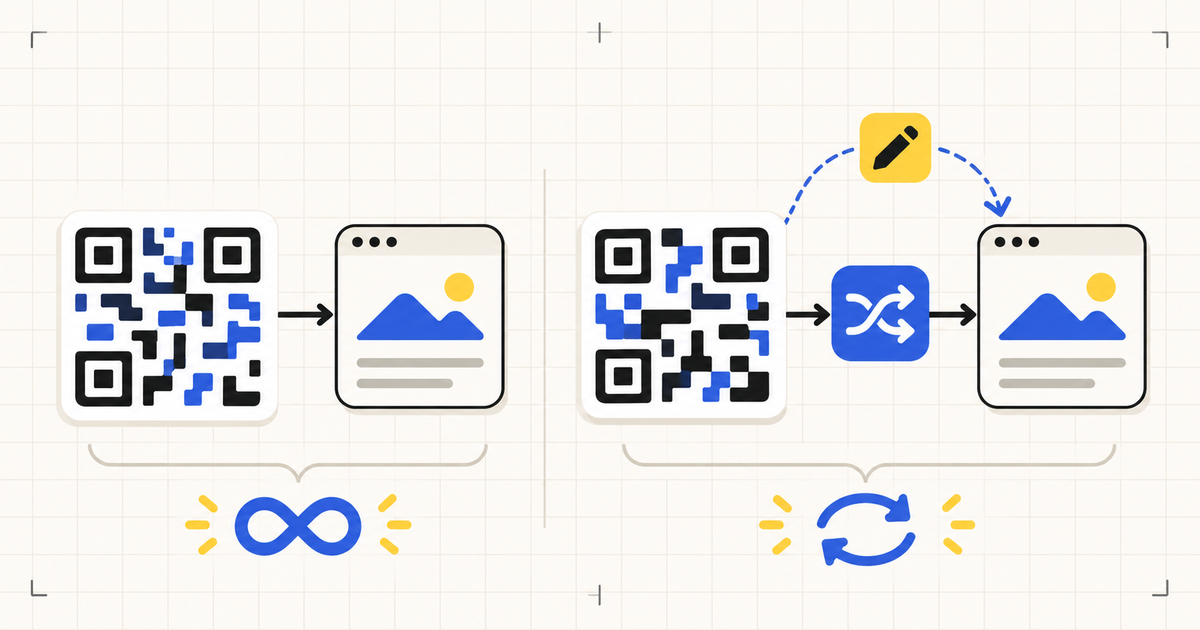
No. A QR code does not have a built-in expiration date. The pattern stores data; it does not contain a timer that starts counting down when you create, download, or print it.
A static QR code can keep decoding indefinitely. What can stop working is the destination behind it, a dynamic redirect service, or the physical print. That distinction is the key to understanding QR code expiration.
Do QR codes expire?
The QR Code standard (ISO/IEC 18004:2024) defines how data is encoded, how the symbol is structured, and how scanners recover it. It does not define a built-in expiration mechanism. In practical terms, the QR image itself does not age out.
Scanning and opening the destination are separate events. A phone may decode the QR code perfectly and still reach a missing page, an inactive domain, or a disabled redirect. When that happens, the code often gets called “expired,” even though the symbol is still readable.
The fastest way to diagnose the problem is to ask two questions: Can the camera read the code? If it can, does the decoded destination still work?
Static vs. dynamic QR codes: where expiration can happen
Static QR codes
A static QR code stores the final content directly in the pattern. For a website code, that means the full destination URL is inside the image. Scanning does not require a QR generator’s redirect server.
That makes a static code a good choice when you want a permanent QR code for a stable URL, Wi-Fi details, plain text, or contact information. The trade-off is that the encoded content cannot be edited after the code has been printed.
QRCodeBarcode’s free static QR code generator creates this direct type of code. It does not depend on a subscription or on QRCodeBarcode servers. The destination still needs to remain available.
Dynamic QR codes
A dynamic QR code stores a managed short link instead of the final destination. When someone scans it, the redirect service sends them to the current destination. That extra step lets you change the destination without reprinting and, depending on the service, view scan counts.
Because the redirect is part of the journey, dynamic QR code validity depends on the provider’s service and policy. A provider may keep links active, let an owner disable them, or offer an explicit expiration setting. Bitly, for example, documents an optional link and QR code expiration feature. That is a vendor-controlled feature, not a rule of the QR standard.
QRCodeBarcode’s current pricing policy says existing dynamic links keep redirecting when a trial ends and the account moves to Free. Dynamic codes still rely on the redirect service, so read the current policy before committing a code to long-lived print.
What does “permanent QR code” really mean?
A permanent QR code usually means a static code whose encoded data does not change and whose operation does not depend on a hosted redirect. It can remain technically valid for as long as the pattern is readable.
Permanent does not mean that every website behind the code will exist forever. A long-lasting static URL code still depends on the URL, domain, hosting, and page structure you chose. If you move the page, add a redirect from the old URL instead of letting it become a dead end.
For non-URL content, permanence has a similar limit. A Wi-Fi QR code may still decode after the password changes, but the saved credentials are no longer useful. The QR code did not expire; the information became outdated.
QR code validity has three layers
It is more useful to check QR code validity in three layers than to ask only whether the code has “expired”:
- Technical validity: The symbol follows the QR format and a scanner can decode its payload.
- Destination validity: The URL, page, domain, file, Wi-Fi credentials, or other encoded content still works.
- Physical validity: The printed or displayed code still has enough contrast, clarity, quiet space, and intact modules to scan reliably.
A code can pass one layer and fail another. For example, a camera can decode a URL correctly while the server responds with 404 Not Found. That is a destination failure, not a QR image expiration.
Why did my QR code stop working?
1. The page moved or was deleted
If the encoded URL points to a page that no longer exists, the scan may end on a 404 page. Restore the content or redirect the old URL to the new location.
2. The domain or hosting became inactive
A QR code can decode correctly while the domain behind it no longer resolves. ICANN notes that an expired domain can interrupt associated websites and services. Keep domains on auto-renew and keep registrar contact and payment details current.
3. A dynamic redirect was disabled
The provider may have disabled the short link, the owner may have paused it, an explicit expiration rule may have fired, or the service may be unavailable. Check the provider dashboard and current terms.
4. The print became hard to scan
Scratches, fading, low contrast, glare, folds, a missing quiet zone, or printing too small can make a valid QR pattern unreadable. Error correction can recover some damaged codewords, but it is not a guarantee that any covered or damaged area will scan.
5. The encoded information became outdated
A changed Wi-Fi password, replaced PDF, old phone number, or temporary file-sharing link can make an otherwise valid static code useless. Update the underlying resource where possible, or create and print a new static code.
Do free QR codes expire?
Not necessarily. Free does not mean temporary. What matters is the code’s architecture.
If a free tool creates a static QR code that contains your direct URL, the code does not need that tool to remain online. You can download the image, close the browser, and scan it later. Adobe Express makes the same distinction in its documentation: its static QR codes do not expire, but changing the URL requires a new code.
A practical trust check is to scan the downloaded image and inspect the decoded address. If it matches the URL you entered, the code is direct. If it uses an unexpected short domain, it may depend on a redirect service.
How long will a QR code last?
- Static URL QR code: Potentially indefinitely, as long as the image remains readable and the destination URL continues to work.
- Static text, contact, or Wi-Fi QR code: As long as the encoded information remains accurate and useful.
- Dynamic QR code: As long as the redirect remains active under the provider’s policy and any owner-set expiration has not been reached.
- Printed QR code: As long as the material and contrast remain good enough for reliable scanning.
There is no universal 30-day, 90-day, or one-year QR code expiration period. If a service shows a deadline, it is a term of that service or campaign—not a timer inside the QR format.
How to keep a QR code working for years
- Use a stable URL on a domain you control.
- Enable domain auto-renewal and keep registrar details up to date.
- Add redirects before moving or renaming pages.
- Avoid temporary file links and short-lived campaign URLs for permanent print.
- Choose a static code when the destination is stable and you do not need editing or analytics.
- Choose a dynamic code when you need to change the destination, and review the provider’s retention and account policies first.
- Keep strong contrast, adequate size, a clear quiet zone, and an undistorted square shape.
- Test the exported file before printing, test a physical sample, and recheck long-running campaigns periodically.
- Keep the original QR image so damaged signs, labels, or packaging can be reproduced.
Which type should you choose?
Choose static when the content is stable and independence matters most. It is the simplest route to a permanent QR code because the final data is stored directly in the image.
Choose dynamic when reprinting would be expensive, the destination may change, or scan counts are useful. In exchange for that flexibility, you accept a redirect-service dependency.
For a deeper comparison, read our static vs. dynamic QR codes guide. Then create a free static QR code or use the dynamic QR code tool when editability is worth the extra dependency.
Frequently asked questions
Can a QR code expire after 30 days?
Not by default. A static QR code has no built-in 30-day timer. A dynamic provider or campaign owner can set a deadline, so check the service’s terms and dashboard.
How long does a static QR code last?
The encoded pattern can remain valid indefinitely. For a URL code, the linked page and domain must also remain available.
Can I create a permanent QR code?
Yes. Create a static QR code with a stable destination you control, download the source image, print it clearly, and maintain the destination over time.
Do printed QR codes expire?
No. Print does not add an expiration date. Fading, damage, glare, poor contrast, or a design that is too small can make the code unreadable.
Can a dynamic QR code expire?
Yes, if the provider or owner disables it or configures an expiration rule. It may also continue working indefinitely; the answer depends on the provider’s policy.
Why does my QR code scan but not open?
The camera has decoded the symbol, but the destination may be offline, removed, blocked, or incorrectly typed. Copy the decoded URL into a browser and check the page, domain, redirects, and HTTPS configuration.
The short answer
QR code expiration is usually not about the square image. Static codes do not expire on their own; dynamic codes depend on a redirect service; and every URL code depends on its destination. For the longest QR code validity, choose the right architecture, control the destination, print carefully, and test periodically.